Don't Buy the Rog Swift Oled Pg42Uq Until You Read This Full Analysis
The transition from traditional LED monitors to OLED technology has been one of the most significant shifts in the high-end gaming market over the last few years. Among the frontrunners of this movement is the ROG Swift OLED PG42UQ, a 41.5-inch gaming monitor that attempts to bridge the gap between a television and a desktop display. On paper, it represents the pinnacle of current display technology, boasting deep blacks, instantaneous response times, and a massive canvas for immersion. However, the premium price tag and the specific characteristics of OLED panels mean that this is not a universal recommendation for every desk setup.
Before investing a significant portion of a hardware budget into this display, potential buyers must understand how it performs beyond the marketing specifications. This analysis explores the nuances of the PG42UQ, examining its thermal management, subpixel structure, firmware history, and practical ergonomics. While it is undoubtedly a flagship device, the "best" monitor is often a matter of context, and for some users, the ROG Swift OLED PG42UQ might be more of a hindrance than a help depending on their specific environment and workflow.
The Evolution of Large-Format Gaming Monitors
For a long time, gamers seeking a large-screen experience were forced to use televisions. While TVs offer size and often excellent picture quality, they traditionally lacked the connectivity and features required for a high-end PC experience, such as DisplayPort inputs, uniform brightness modes, and wake-from-sleep functionality. The ROG Swift OLED PG42UQ was designed specifically to solve these "TV-as-a-monitor" pain points. By utilizing a 42-inch LG Display OLED panel—the same found in the popular C-series televisions—and wrapping it in a monitor-first chassis with a custom heatsink, Asus aimed to create the ultimate hybrid.
The result is a device that feels substantially more robust than a consumer television. The inclusion of a matte micro-texture coating rather than a glossy finish is the first major indicator of its monitor DNA. This design choice is aimed at reducing glare in office environments, but as we will discuss later, it is a point of contention among enthusiasts. Furthermore, the PG42UQ includes the Republic of Gamers' signature aesthetic, complete with a tripod stand and Aura Sync lighting, signifying its place at the top of the gaming hierarchy.
Detailed Product Analysis
The Magic of OLED and the Custom Heatsink
The primary draw of the PG42UQ is the OLED panel itself. Unlike traditional LCDs that require a backlight, OLED pixels are self-emissive. Each of the 8.3 million pixels in this 4K display can turn off completely, resulting in an "infinite" contrast ratio. In dark scenes of games like Alan Wake 2 or Cyberpunk 2077, the difference is transformative. There is no "blooming" or "halo" effect around bright objects, a common flaw in even the best Mini-LED monitors.
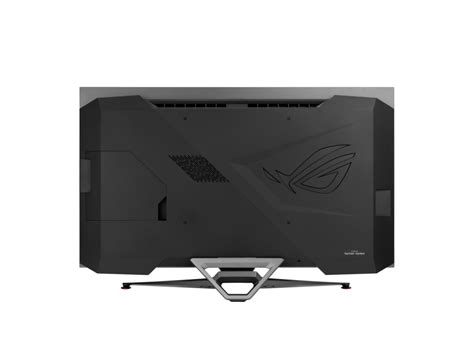
One of the primary risks with OLED is burn-in and thermal throttling. Asus addressed this by installing a large custom heatsink behind the panel. This is a critical distinction from standard OLED TVs. By drawing heat away from the organic material more efficiently, the monitor can theoretically sustain higher peak brightness levels and reduce the risk of permanent image retention. In practice, this means the monitor doesn't have to resort to aggressive Automatic Brightness Limiting (ABL) as quickly as some competitors, providing a more consistent desktop experience when switching between dark and light windows.
Text Clarity and Subpixel Layout
A significant hurdle for OLED monitors in a desktop environment is text rendering. The PG42UQ uses a WOLED (White-OLED) panel with an RWBG subpixel layout. Standard Windows and macOS font rendering systems are optimized for RGB layouts. Because of the extra white subpixel and the non-standard arrangement, users may notice "color fringing" on the edges of text, particularly on high-contrast backgrounds. While this becomes less noticeable at 4K resolution given the pixel density, users who spend eight hours a day coding or writing should be aware that the sharpness of text will not match a high-end IPS or VA panel of the same resolution.
Connectivity and Gaming Features
One area where the PG42UQ justifies its price is in its connectivity suite. It features two HDMI 2.1 ports with full 48Gbps bandwidth, two HDMI 2.0 ports, and a DisplayPort 1.4 port (with Display Stream Compression). This makes it an ideal hub for someone who owns a high-end PC, a PlayStation 5, and an Xbox Series X. The monitor supports a native 138Hz refresh rate (overclocked), which provides a slight edge over the 120Hz standard found on most OLED TVs. Furthermore, the inclusion of a USB hub and a tripod socket on the top for webcams or streaming lights speaks directly to the modern content creator's needs.
Looking for the best Electronics deals on Amazon?
View Offers →Matte vs. Glossy: The Great Debate
One of the most discussed aspects of this monitor is its matte coating. Most OLED televisions use a glossy finish which makes colors "pop" and blacks look inkier, but at the cost of reflecting every light source in the room. Asus opted for a matte micro-texture coating to diffuse reflections. In a room with controlled lighting, the matte coating can make the blacks appear slightly grey or "lifted" compared to a glossy screen. However, in a bright room with windows behind the sitter, the matte finish makes the monitor far more usable. This is a trade-off that potential buyers must evaluate based on their specific room lighting.
The PG42UQ also features a "Uniform Brightness" setting. Standard OLEDs fluctuate in brightness based on how much of the screen is white (to protect the panel). This can be incredibly distracting when resizing windows or browsing the web. The Uniform Brightness mode caps the peak brightness to a level that the monitor can maintain regardless of content, resulting in a much more stable and "LCD-like" experience for productivity tasks.
Pros and Cons
- Unmatched Contrast: The ability to achieve true black levels creates a sense of depth and realism that no LCD technology can replicate, especially in HDR content.
- Instantaneous Response Times: With a 0.1ms GtG response time, motion blur is virtually non-existent, making it one of the smoothest experiences for fast-paced shooters and racing games.
- Monitor-Specific Features: Unlike a TV, it has DisplayPort 1.4, a built-in USB hub, and a tripod mount, facilitating a cleaner and more functional desk setup.
- Thermal Management: The custom internal heatsink allows for better peak brightness longevity and helps mitigate the long-term risks associated with OLED heat buildup.
- Comprehensive Connectivity: Four HDMI ports and DisplayPort allow for the simultaneous connection of multiple consoles and PCs without needing an external switcher.
- Large Screen Real Estate: At 41.5 inches, it offers the equivalent space of four 21-inch 1080p monitors, providing immense room for multitasking and immersive gaming.
- Risk of Permanent Burn-in: Despite the heatsink and software protections, OLED remains susceptible to image retention if static elements (like taskbars or HUDs) are displayed for thousands of hours at high brightness.
- Subpixel Text Fringing: The RWBG subpixel layout can cause text to look less sharp than traditional RGB monitors, which may bother users focused on heavy productivity.
- Aggressive ABL (Automatic Brightness Limiter): While Asus has improved this, the monitor will still dim noticeably when a large white window is opened, unless the "Uniform Brightness" mode is engaged.
- Matte Finish Contention: Enthusiasts who prefer the "inky" depth of a glossy OLED might find the matte coating dulls the vividness of the image in dark rooms.
- Size Constraints: A 42-inch screen is massive for a standard desk. It requires a deep desk (at least 30 inches) to avoid neck strain and to perceive the entire screen at once.
- Firmware Inconsistencies: Historically, some users have reported issues with HDR calibration and wake-from-sleep bugs that required manual firmware updates to resolve.
Technical Specifications Comparison
| Feature | ROG Swift PG42UQ | Typical 42" OLED TV | 32" 4K IPS Gaming Monitor |
|---|---|---|---|
| Panel Type | WOLED (Matte) | WOLED (Glossy) | IPS (LED Backlit) |
| Refresh Rate | 138Hz (OC) | 120Hz | 144Hz - 240Hz |
| Response Time | 0.1ms (GtG) | 0.1ms (GtG) | 1.0ms (GtG) |
| Contrast Ratio | 1,500,000:1 | 1,500,000:1 | 1,000:1 |
| DisplayPort | Yes (v1.4) | No | Yes (v1.4 / 2.1) |
| Heatsink | Custom Internal | Standard/None | None Required |
Real-World Use Cases
The Immersion-Focused Gamer
For the player who spends most of their time in narrative-driven, atmospheric titles like Elden Ring or The Last of Us Part I, the PG42UQ is nearly perfect. In these scenarios, the 42-inch screen fills the field of view, and the OLED contrast makes dark corridors and glowing magical effects look spectacular. The subtle details in the shadows that are usually washed out on an IPS display are revealed with precision here. Moreover, because these games aren't as "twitch-heavy" as competitive shooters, the 138Hz refresh rate is more than sufficient.
The Competitive Esports Player
In contrast, those who play Valorant, Counter-Strike 2, or Overwatch 2 professionally or semi-professionally might find the PG42UQ to be "too much monitor." Tracking enemies across a 42-inch canvas requires significant eye and neck movement compared to a 24-inch or 27-inch display. While the 0.1ms response time is a huge advantage for motion clarity, most competitive players would benefit more from a higher refresh rate (240Hz or 360Hz) on a smaller panel where the entire image fits within their central vision.
The Creative Professional
Photographers and video editors will appreciate the color gamut of the PG42UQ, which covers approximately 98% of DCI-P3. However, there is a caveat. OLED brightness can shift based on the content on the screen, which can make consistent color grading difficult if not properly calibrated and locked. Additionally, the risk of burn-in from static UI elements in software like Adobe Premiere or DaVinci Resolve is a legitimate concern for those who work 40+ hours a week in these applications. For professional color-critical work, a dedicated HDR mastering monitor or a high-end Mini-LED may still be the safer bet.
Buying Guide: Is the PG42UQ Right for You?
Buying a 42-inch monitor is not as simple as checking your bank balance; it requires a physical assessment of your workspace and an honest look at your usage patterns. Follow these considerations before making the purchase.
Physical Desk Depth
The number one reason for returning large-format monitors is discomfort. To comfortably view a 42-inch screen without seeing individual pixels or straining your neck, you should ideally sit between 30 and 40 inches away from the panel. If your desk is only 24 inches deep, the monitor will feel overwhelming, and you will likely find yourself constantly leaning back. Before buying, measure your desk and consider whether a wall mount or a heavy-duty monitor arm would be necessary to push the screen further back.
Discover deals on Electronics — updated daily.
Browse Now →Environment Lighting
Evaluate your room's light sources. If you have a window directly behind you, the matte coating on the PG42UQ will be a godsend, as it prevents the distracting mirror-like reflections found on glossy OLEDs. However, if you always game in a dark or dimly lit room, you might actually prefer the extra "shimmer" and depth provided by a glossy display. Glossy panels tend to look slightly sharper because there is no diffusive layer between the pixels and your eyes.
Usage Balance
If your PC usage is 80% gaming and 20% web browsing, the PG42UQ is a fantastic choice. However, if you work from home and spend 8 hours a day on Excel spreadsheets, Slack, and Word documents followed by 2 hours of gaming, you are not the target audience for this monitor. Static white backgrounds and thin black text are the two things OLED handles worst—both in terms of visual clarity (fringing) and panel health (burn-in risk).
The Firmware Factor
Early batches of the PG42UQ suffered from various software bugs, including issues with the "Auto-Wake" feature and HDR color mapping. While Asus has released several firmware updates to address these, the process of updating a monitor is more involved than updating a GPU driver. If you are someone who wants a "plug-and-play" experience without ever checking a support page for downloads, you may find the maintenance of a high-end OLED slightly more demanding than a standard LED monitor.
Maintaining Your OLED Investment
If you decide the PG42UQ is the right fit, you must be prepared to change some habits to ensure the panel lasts for years. This includes setting the Windows taskbar to "Auto-hide," using a black or rotating wallpaper, and avoiding leaving static windows open for hours at a time. The monitor includes built-in features like "Pixel Cleaning" and "Screen Move" (which subtly shifts the image by a few pixels every so often). It is vital to let these processes run. Unlike an old LCD that you could leave on for three days straight without issue, an OLED requires a bit of "self-care" to maintain its pristine image quality.
Conclusion
The ROG Swift OLED PG42UQ represents a specific vision of the future of desktop computing: one where the boundaries between television-style cinematic immersion and monitor-style precision are blurred. Its custom heatsink, high refresh rate, and professional gaming features make it a standout achievement in the display market. It successfully addresses many of the frustrations users faced when trying to use small OLED TVs as monitors, providing a much-needed DisplayPort input and better thermal reliability.
However, the recommendation to buy it comes with significant strings attached. It is a niche product intended for a specific user: someone with a deep desk, a love for high-contrast HDR gaming, and the discipline to manage an OLED panel's unique requirements. For the competitive gamer or the dedicated office worker, there are better, more ergonomic, and more durable options available. The PG42UQ is a specialized tool—the "supercar" of the monitor world. It offers incredible performance under the right conditions, but it requires the right environment and regular maintenance to truly shine. If your setup can accommodate its size and your eyes can tolerate its subpixel layout, it offers one of the most breathtaking visual experiences currently available in the electronics market.